
Nagios 4 на ЦентОС 7 – мониторинг Виндовс хоста (2/3)
Настављамо са изменама у конфигурацији Nagios-а. Први део упутства можете видети овде.
У овом другом делу ћемо дефинисати измене основних конфигурационих фајлова и припремити све за мониторинг сервиса на Виндовс hostу и за дефинисање команди и сервиса које ћемо обрадити у трећем делу.
Мењамо следеће:
- nagios.cfg – главни конфигурациони фајл
nano /usr/local/nagios/etc/nagios.cfg
Додајемо следеће линије:
cfg_file=/usr/local/nagios/etc/objects/commands.cfg
cfg_file=/usr/local/nagios/etc/objects/contacts.cfg
cfg_file=/usr/local /nagios/etc/objects/timeperiods.cfg
cfg_file=/usr/local/nagios/etc/objects/templates.cfg
cfg_file=/usr/local/nagios/etc/objects/hostgroups.cfg
cfg_file=/usr/local/nagios/etc/objects/hosts.cfg
cfg_file=/usr/local/nagios/etc/objects/services.cfg
нећемо још стављати тарабу (#) испред localhost.cfg. Оставићемо линију
cfg_file=/usr/local/nagios/etc/objects/localhost.cfg
При инсталацији nagiosgraph-а већ смо дефинисали perfdata.log и service_perfdata_file_template
service_perfdata_file=/usr/local/nagios/var/perfdata.log
service_perfdata_file_template=$LASTSERVICECHECK$||$HOSTNAME$||$SERVICEDESC$||$SERVICEOUTPUT$||$SERVICEPERFDATA$
- resources.cfg – помоћни конфигурациони фајл, путања је /usr/local/nagios/etc
nano /usr/local/nagios/etc/resource.cfg
$USER1$=/usr/local/nagios/libexec
$USER2$=/usr/local/nagios/libexec/eventhandlers
#$USER3$=someuser
#$USER4$=somepassword
$USER7$=-C communitystring1
$USER8$=-C communitystring2
Овде уместо communitystring1 и communitystring2 уписати одговарајуће SNMP community string-ове са рутера и са сервера. (Биће објашњено где се поставља на WinServer-у мало касније.)
- Мењамо и object фајлове на путањи /usr/local/nagios/etc/objects/
прво подешавамо параметре у општим object конфигурационим фајловима
timeperiods.cfg
contacts.cfg
templates.cfg
1) timeperiods.cfg
nano /usr/local/nagios/etc/objects/timeperiods.cfg
Дефинишемо временски период када ћемо да вршимо надгледање hostова и сервиса. Имамо предефинисан период 24×7 који обухвата непрестани мониторинг. Можемо да дефинишемо и додатни временски период како би мониторисали само, на пример, током радног времена.
Пример 1 – већ дефинисан временски период у фајлу
# This defines a timeperiod where all times are valid for checks,
# notifications, etc. The classic "24x7"

define timeperiod{
timeperiod_name 24x7
alias 24 Hours A Day, 7 Days A Week
sunday 00:00-24:00
monday 00:00-24:00
tuesday 00:00-24:00
wednesday 00:00-24:00
thursday 00:00-24:00
friday 00:00-24:00
saturday 00:00-24:00
}
Пример 2 – и ово је већ дефинисано али мењамо радне сате ако је другачије код нас
# 'workhours' timeperiod definition

define timeperiod{
timeperiod_name workhours
alias Normal Work Hours
monday 07:30-17:00
tuesday 07:30-17:00
wednesday 07:30-17:00
thursday 07:30-17:00
friday 07:30-17:00
}
2) contacts.cfg
nano /usr/local/nagios/etc/objects/contacts.cfg
Постављамо контакте који ће бити обавештени путем мејла о променама (отказ или опоравак) сервиса и hostова.
Пример 1:
define contact{
contact_name nagiosadmin ; Short name of user
use generic-contact ; Definisano u fajlu templates.cfg
alias Nagios Admin ; Full name of user

email nagiosadmin@admin.co.rs ; <<*CHANGE THIS TO YOUR EMAIL ADDRESS ******
}
Пример 2:
# 'administrator' contact definition
define contact{
contact_name administrator
alias Admin Admin
service_notification_period 24x7
host_notification_period 24x7
service_notification_options w,c,u,r
host_notification_options d,u,r
service_notification_commands notify-service-by-email
host_notification_commands notify-host-by-email
email admin@admin.co.rs ; promeniti u svoj mejl
}
Ако имамо више дефинисаних контаката онда дефинишемо и контакт групе
define contactgroup{
contactgroup_name admins
alias Nagios Administrators
members nagiosadmin,administrator
}
3) templates.cfg
nano /usr/local/nagios/etc/objects/templates.cfg
Дефинишемо обрасце за проверу host-ова и сервиса које после користимо у дефиницијама host-ова и сервиса као и образац за контакт. Generic-contact, generic-host, linux-server и windows-server су већ дефинисани у фајлу templates.cfg
Пример 1 – generic contact:
define contact{
name generic-contact ; The name of this contact template
service_notification_period 24x7 ; service notifications can be sent anytime
host_notification_period 24x7 ; host notifications can be sent anytime
service_notification_options w,u,c,r,f,s ; send notifications for all service states
host_notification_options d,u,r,f,s ; send notifications for all host states
service_notification_commands notify-service-by-email ; send service notifications via email
host_notification_commands notify-host-by-email ; send host notifications via email
register 0
}
Пример 2 – generic host:
define host{
name generic-host ; The name of this host template
notifications_enabled 1 ; Host notifications are enabled
event_handler_enabled 1 ; Host event handler is enabled
flap_detection_enabled 1 ; Flap detection is enabled
process_perf_data 1 ; Process performance data
retain_status_information 1 ; Retain status information across program restarts
retain_nonstatus_information 1 ; Retain non-status information across program restarts
notification_period 24x7 ; Send host notifications at any time
register 0
}
Пример 3 – linux server:
define host{
name linux-server ; The name of this host template
use generic-host ; Koristimo vrednosti generic-host template
check_period 24x7 ; By default, Linux hosts are checked round the clock
check_interval 5 ; Actively check the host every 5 minutes
retry_interval 1 ; Schedule host check retries at 1 minute intervals
max_check_attempts 10 ; Check each Linux host 10 times (max)
check_command check-host-alive ; Default command to check Linux hosts
notification_period workhours ; Send notification workhours, potire se jer koristimo generic host vrednost za notification period
notification_interval 120 ; Resend notifications every 30 minutes
notification_options d,u,r ; Only send notifications for specific host states (downtime, uptime, recovery)
notifications_enabled 1
contact_groups admins ; Notifications get sent to the admins by default
icon_image linux40.png
icon_image_alt Linux
vrml_image linux40.png
statusmap_image linux40.gd2
2d_coords 100,250
3d_coords 100.0,50.0,75.0
register 0
}
Пример 4 – windows server:
define host{
name windows-server ; The name of this host template
use generic-host ; Inherit default values from the generic-host template
check_period 24x7 ; By default, Windows servers are monitored round the clock
check_interval 5 ; Actively check the server every 5 minutes
retry_interval 1 ; Schedule host check retries at 1 minute intervals
max_check_attempts 10 ; Check each server 10 times (max)
check_command check-host-alive ; Default command to check if servers are "alive"
notification_period 24x7 ; Send notification out at any time - day or night
notification_interval 30 ; Resend notifications every 30 minutes
notification_options d,u,r ; Only send notifications for specific host states
notifications_enabled 1
contact_groups admins ; Notifications get sent to the admins by default
hostgroups windows-servers
icon_image win40.png
icon_image_alt Windows
vrml_image win40.png
statusmap_image win40.gd2
2d_coords 100,250
3d_coords 100.0,50.0,75.0
register 0
}
Пример 5 – generic service
# Generic service definition template - This is NOT a real service, just a template!

define service{
name generic-service ; The 'name' of this service template
active_checks_enabled 1 ; Active service checks are enabled
passive_checks_enabled 1 ; Passive service checks are enabled/accepted
parallelize_check 1 ; Active service checks should be parallelized (disabling this can lead to major performance problems)
obsess_over_service 1 ; We should obsess over this service (if necessary)
check_freshness 0 ; Default is to NOT check service 'freshness'
notifications_enabled 1 ; Service notifications are enabled
event_handler_enabled 1 ; Service event handler is enabled
flap_detection_enabled 1 ; Flap detection is enabled
process_perf_data 1 ; Process performance data
retain_status_information 1 ; Retain status information across program restarts
retain_nonstatus_information 1 ; Retain non-status information across program restarts
is_volatile 0 ; The service is not volatile
check_period 24x7 ; The service can be checked at any time of the day
max_check_attempts 3 ; Re-check the service up to 3 times in order to determine its final (hard) state
normal_check_interval 10 ; Check the service every 10 minutes under normal conditions
retry_check_interval 2 ; Re-check the service every two minutes until a hard state can be determined
contact_groups admins ; Notifications get sent out to everyone in the 'admins'
notification_options w,u,c,r ; Send notifications about warning, unknown, critical, and recovery events
notification_interval 60 ; Re-notify about service problems every hour
notification_period 24x7 ; Notifications can be sent out at any time
register 0
}
Пример 6
# Template definicija dummy hosta, nepostojeceg hosta koji se uvode samo u cilju povecanja preglednosti

define host{
name dummy-generic-template
alias logicka predstava prostorija(ovo nije realan host)
notifications_enabled 0
event_handler_enabled 1 ; Host event handler is enabled
flap_detection_enabled 0 ; Flap detection is enabled
process_perf_data 0 ; Process performance data
retain_status_information 1 ; Retain status information across program restarts
retain_nonstatus_information 1 ; Retain non-status information across program restarts
check_command check-host-alive
check_period 24x7 ; By default, Linux hosts are checked round the clock
check_interval 60 ; Actively check the host every 60 minutes
retry_interval 1 ; Schedule host check retries at 1 minute intervals
max_check_attempts 10 ; Check each dummy host 10 times (max)
contact_groups admins ; Notifications get sent to the admins by default
hostgroups dummy-hosts
icon_image_alt Nepostojeci virtuelni host
icon_image netcloud.jpg
statusmap_image netcloud.jpg
vrml_image netcloud.jpg
register 0
}
Дефиницију service-graph смо унели при конфигурацији nagiosgraphа, видети упутство на овом линку. Остале темплејте не разматрамо јер нам, за сада, нису потребни. То су generic-printer, generic-switch.
• Дефинисање Windows Server-а као host-а
Креирамо фајл и допунимо га доле дефинисаним параметрима
nano /usr/local/nagios/etc/objects/hosts.cfg
##########################################################################
#
# HOST DEFINITIONS
#
################################################################################
#dodajemo win server WinServer1
define host{
use windows-server ; koristimo već definsan template windows-server
host_name WinServer1 ; ime našeg servera
alias server1.domen.co.rs ; domensko ime servera
parents Beograd-Centrala ; dummy-host, nepostojeći host koji služi za status mapu
address XXX.XXX.XXX.XXX ; Ip adresa našeg servera
}
define host{
use dummy-generic-template; već definisan template
host_name Beograd-Centrala; ime nepostojećeg hosta
alias Serveri u centrali
address xxx.xxx.xxx.xxx ; ip adresa localhosta za dummy-host
}
• Дефинисање hostgroup-а
Креирамо фајл и допунимо га доле дефинисаним параметрима
Дефиниција linux групе нам је већ дефинисана у фајлу localhost.cfg па је сад не дефинишемо (само су тарабе # испред дефиниција)
nano /usr/local/nagios/etc/objects/hostsgroups.cfg
##############################################
#
#HOST GROUP DEFINITIONS
#
##############################################

# definicija 'linux-serveri'
#define hostgroup{
#hostgroup_name linux-servers
#alias Linux Serveri
#members localhost
#}

# definicija 'dummy-hosts'
define hostgroup{
hostgroup_name dummy-hosts
alias Dummy Hosts
members Beograd-Centrala
}

# definicija 'windows-serveri'
define hostgroup{
hostgroup_name windows-servers
alias Windows Serveri
members WinServer1
}
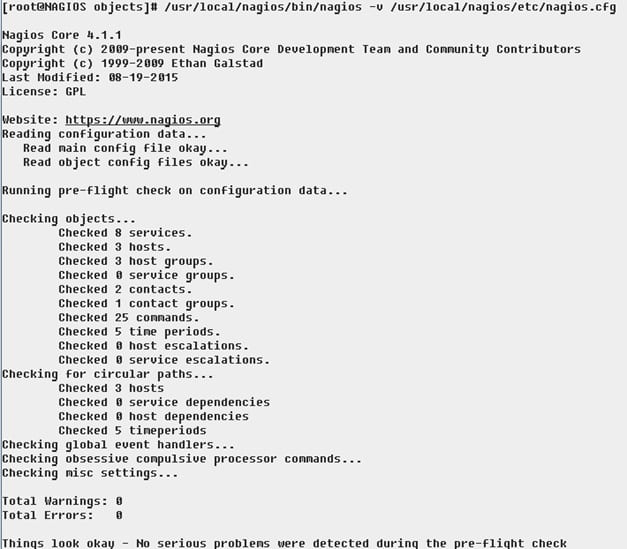
Сада већ можемо да проверимо конфигурацију Nagios-а да видимо да ли смо додали у host-ове нови Windows Server.
Команда је:
/usr/local/nagios/bin/nagios -v /usr/local/nagios/etc/nagios.cfg
Treba da dobijemo sledeću sliku ako nema grešaka:
Рестартовање Nagios сервиса
/etc/init.d/nagios restart
После примене треба да добијемо следећи приказ у нашем веб браузеру:

Статус мапа треба да изгледа као на следећој слици:

Овим смо завршили и други део наше конфигурације.
Преостаје још трећи део у коме ћемо дефинисанти и проверити команде и дефинисати и проверити сервисе које мониторишемо.
<<< НАЗАД НА 1. ДЕО УПУТСТВА | ПРЕЂИТЕ НА 3. ДЕО УПУТСTВА >>>